
Become a supporter
When I click on Routes in the Android app, the bar that says 'Route folders' is displayed over the first few folders, see attached screenshot. This is on Android 15 on a Motorola Edge 6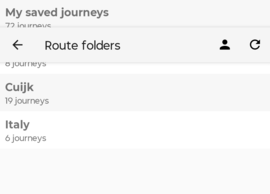
I recently gifted cycle.travel membership to someone. They are not able to get this to work, they can log into Patreon and access the cycel.travel newsletter, but in the cycle.travel app and on the website the banner to become a supporter is still there, and for example the additional map options are not available. Hopefully you can see what's wrong.
First of all let me say this site is an amazingly good route planning tool. I have some questions about uploading gpx files:
- when I download a suggested route from cycle.travel as a gpx file, and then upload that route later in order to edit it, I get a single point on the map. It seems that the route is pruned back to the starting/finishing point (which in a suggested route are the same point). Indeed, if I delete a few points using gpsprune and thus make sure there is a gap between the start and end point, the route loads ok. Basically cycle.travel decides that there is no need to go anywhere when you want to end up where you start - great logic, but not a philosophy that works well for travellers :-)
- uploading a gpx file always makes cycle.travel reinterpret the route before displaying it. Especially when the route is a track I have cycled before (and therefore there are no waypoints to 'pin' the route), this often changes the route dramatically. It would be great if the upload function would have a tick box to specify 'display the route as is'.


Made in the Cotswolds. Published by Éditions Système D Ltd.
Log in with your cycle.travel account:
| Password |
Or simply use your account on:
